
Pasture Points Rewards
Our way of saying thanks for supporting regenerative wellness. Earn points on every purchase and turn them into real dollars off future orders. Earn 1 point per dollar spent on qualifying purchases. Every 10 points = $1 in real spend.
Go To My AccountWait, where did my points go?
Did you click “Redeem” and now your points are missing? Don’t panic!
When you redeem Pasture Points, they instantly convert into a Coupon Code. You haven’t lost them — they are waiting for you in the “Coupons” tab of your Rewards dashboard. You can apply them to your cart from there, or revert them back into points!
Ways to Build Your Balance
Per Dollar Spent
Earn 1 Pasture Point for every dollar you spend on eligible products (excluding certain bundles).
Register Account
Create a free account and we’ll thank you with 10 points immediately.
Leave a Review
We will email you two weeks after your order has been delivered asking for a review. Leave one to earn points!
Celebrate Birthday
We want to celebrate with you! Earn 100 points on your special day.
Social Follows
Earn 25 points when you share us on Facebook, and another 25 points for following us on Instagram.
Build Your Balance
Browse the shop and start building your rewards balance immediately.
How Your Dashboard Works
1. Your Balances
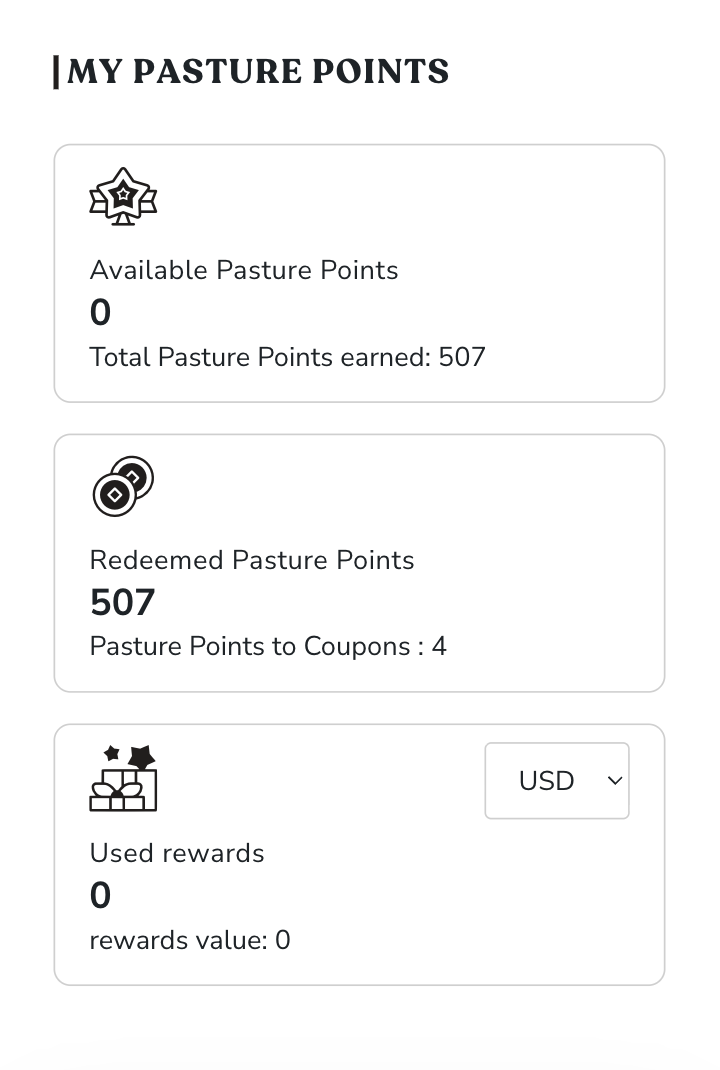
Log into My Account and click Pasture Points & Rewards. At the very top, you’ll see three tiles:
- Available Pasture Points: Raw points you’ve earned that haven’t been touched yet.
- Redeemed Pasture Points: The total lifetime points you’ve converted.
- Used Rewards: The total dollar value of rewards you’ve actually spent.
2. The Coupons Tab (Important!)
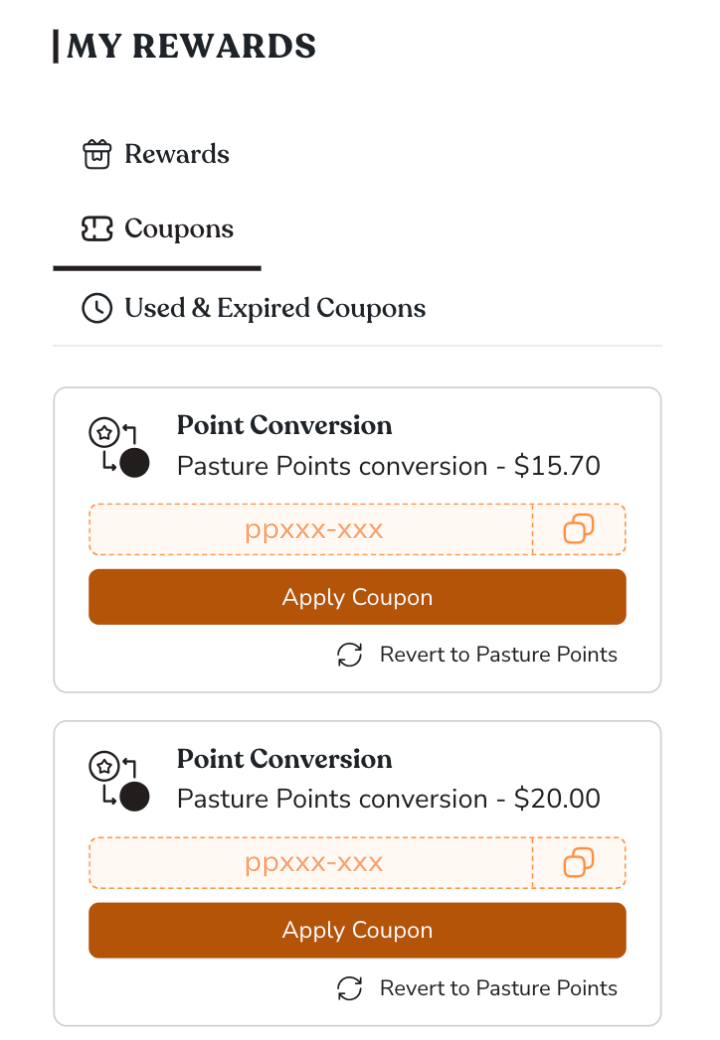
This is where the magic happens. Once you choose to redeem your points, they move here and become a coupon. Inside the Coupons tab, you can:
- Click Apply Coupon to instantly add the discount to your active shopping cart.
- Click the Copy Icon to copy the code and paste it at checkout manually.
- Click Revert to Pasture Points if you change your mind and want to save your points for later. Your coupon will vanish, and your points balance will go back up!
3. Tracking Your History
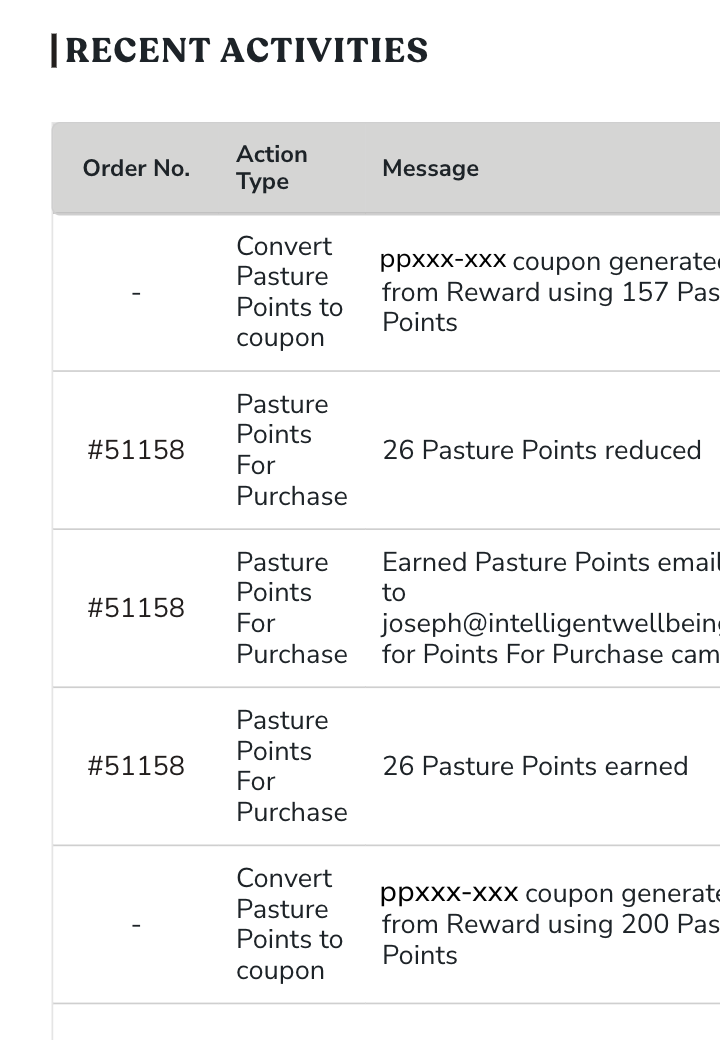
Scroll down to the Recent Activities section to see a complete ledger of your account. It tracks every point earned from purchases, every point converted into a coupon, and every coupon successfully used at checkout.
Frequently Asked Questions
I redeemed my points, but they disappeared and didn’t apply to my order!
Don’t worry, they are safe! When you click “Redeem,” your points are immediately converted into a coupon code. To find this code, go to your Account Dashboard, click “Pasture Points & Rewards,” and open the Coupons tab. From there, you can click “Apply Coupon” to add it to your cart, or click “Revert to Pasture Points” to undo the conversion.
How do I join the Pasture Points program?
Simply create an account on our website. It’s free, and you’ll automatically start earning Pasture Points. Plus, we’ll gift you 10 points just for signing up.
How do I redeem my Pasture Points?
See the visual guide above! Go to your account, click “Pasture Points & Rewards,” and convert your points into a coupon code.
Why didn’t I get Pasture Points for my order?
There could be a few reasons. First, bundles do not earn points. Second, sometimes it takes a little time for points to process. Or, you weren’t logged into your account when purchasing. If you don’t see them after 48 hours, reach out through our Contact page!
Why won’t my Pasture Points coupon apply at checkout?
If your code won’t apply, there may be a restriction on the specific items in your cart (for example, certain heavily discounted bundles are excluded), or there is a restriction on the discount you’re trying to use and Pasture Points codes. If this happens, your coupon code remains completely unused. You can leave it in your Coupons tab for next time, or revert it back to raw points.
Do Pasture Points apply to recurring subscriptions?
Pasture Points do apply to the first-time initial purchase of a subscription, but they will not apply to or lower your ongoing monthly renewal costs.
How can I tell if I’ve actually used a coupon?
Inside your rewards dashboard, click on the Used & Expired Coupons tab. If you successfully checked out using a Pasture Points coupon, it will be permanently logged here. You can also view your exact history in the “Recent Activities” table at the bottom of the page.
How do I earn points for leaving a review?
To earn the 5 points for a review, you must manually navigate to the product page on our website and submit your review there. (Points are always awarded for leaving a review in response to an automated review request email).
Still need help finding your points?
Reach us anytime at support@intelligentwellbeing.com